Issue 03 · 2026 Open Source · MIT iOS 17.6+ · Android 8.0+

Fud AI app,
calorie tracker.

The Fud app is a free, open-source AI calorie tracker and food scanner for iPhone and Android. Snap a photo, combine two camera shots, scan a packaged-food barcode, add a note to camera or library meals, speak your meal, or type it — bring your own AI provider, or use optional Fud AI Plus on iOS with no API setup. Track weight and body fat together, customize Home nutrient cards, set optional detailed nutrient goals, and let AI suggest those goals without changing the core calorie and macro calculator.

AI Food Recognition Barcode Lookup Expanded Nutrients Voice Input · 6 STT Options Theme Colors · Matching Icons 13 LLM Providers AI Coach Chat Smart Serving Units Apple Health · Health Connect 15 Languages iOS + Android Open Source · MIT Bring Your Own Key AI Food Recognition Expanded Nutrients Voice Input · 6 STT Options Theme Colors · Matching Icons 13 LLM Providers AI Coach Chat Smart Serving Units Apple Health · Health Connect 15 Languages iOS + Android Open Source · MIT Bring Your Own Key
§ 01   By the Numbers
13
Nutrients tracked per meal
13
AI providers supported
15
Languages, auto-localized
100%
On-device storage
§ 02   Chapters

What it does, chapter by chapter.

01

Capture a meal.

Photo · Barcode · Note · Voice · Text · Manual

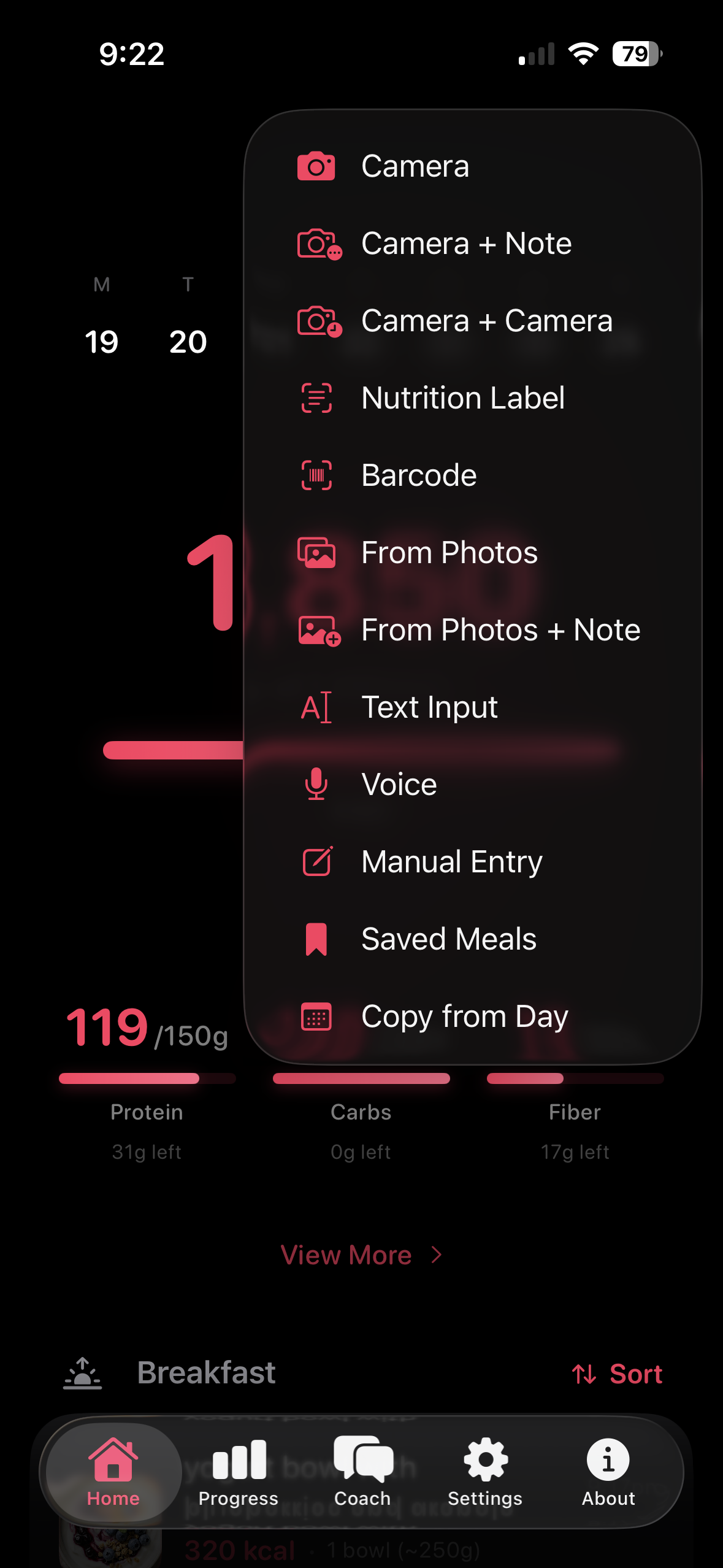
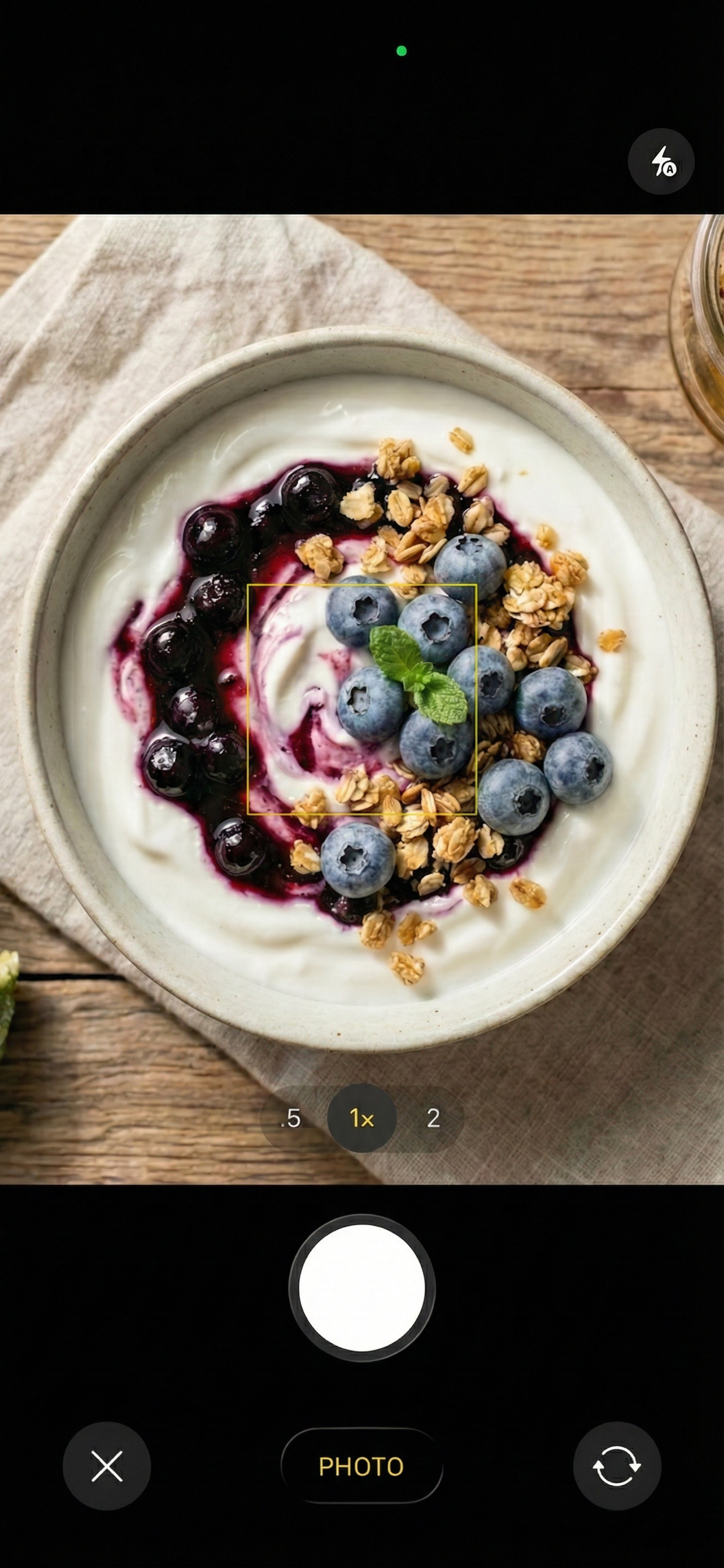
Snap a photo of any meal, scan a packaged-food barcode, add a note to a camera or photo-library image, scan a nutrition label, speak your lunch hands-free, type it, or enter macros manually when you already know them.

  • Native camera + photo library import on both platforms, with optional notes for extra meal context
  • Barcode lookup on iOS and Android uses Open Food Facts when public packaged-food data is available
  • Voice input via 6 speech-to-text options with per-provider language selection
  • Smart serving units show slices, pieces, cups, ml, or similar units when the AI can infer them
  • Text and manual fallbacks for quick logging
02

AI does the math.

13 LLM providers

Bring your own key, or use optional Fud AI Plus on iOS for no-key Gemini food analysis, Deepgram voice transcription, and Coach access. BYOK lets you choose from Gemini, OpenAI, Anthropic Claude, Grok, OpenRouter, Together AI, Groq, Hugging Face, Fireworks, DeepInfra, Mistral, Ollama (local), or any custom OpenAI-compatible endpoint. On Android, Coach can also include camera or photo-library image attachments.

  • Open-weight vision models out of the box: Gemma, Llama Vision, Qwen VL, Pixtral
  • OpenRouter testable on $0 credits — the openrouter/free default routes to a free vision model so you can try the integration without funding the account
  • Custom AI Instructions — optional Settings text appended to every AI request. Drop your region, diet, or brand context once instead of repeating it per meal ("I live in Germany, prefer ALDI/REWE brands" or "I'm on a bodybuilding cut")
  • Fallback Provider — opt-in second provider that auto-retries when your primary fails on overload, rate limit, or network error. Pair a paid model with a free fallback for cheap reliability
  • API keys stored in iOS Keychain (iOS) or EncryptedSharedPreferences with AES-256 (Android) — never transmitted to us
  • Switch providers and models anytime; transient overloads (503 / 429 / 529) auto-retry with backoff, and AI responses with surrounding prose or markdown fences are parsed reliably
03

Track expanded nutrients.

Macros + micros

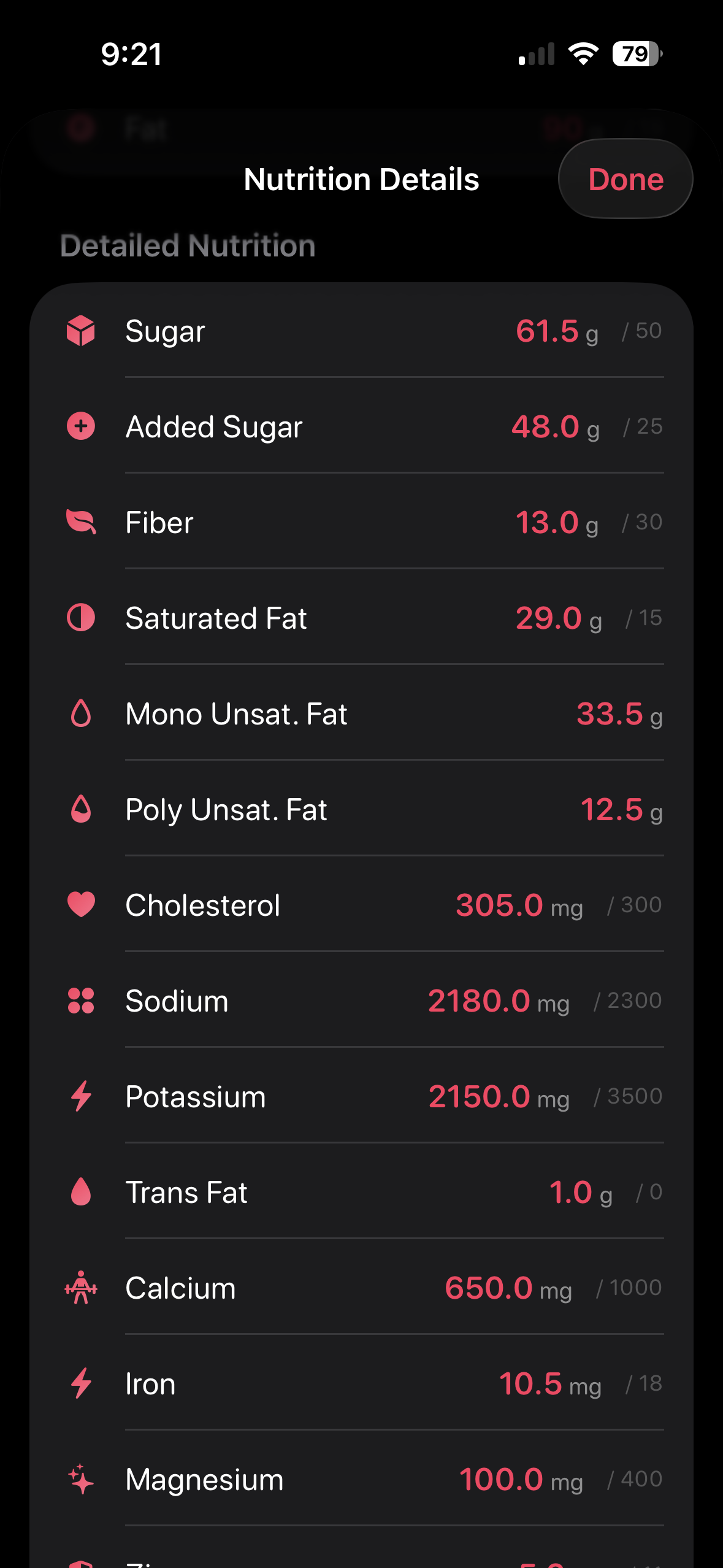
Calories, protein, carbs, fat, sugar, fiber, saturated fat, trans fat, mono-unsaturated fat, poly-unsaturated fat, cholesterol, sodium, potassium, calcium, iron, magnesium, zinc, vitamins A/C/D/E/K/B12, folate, omega-3, and more when available — adjustable serving sizes and AI-suggested units recalculate every logged entry live.

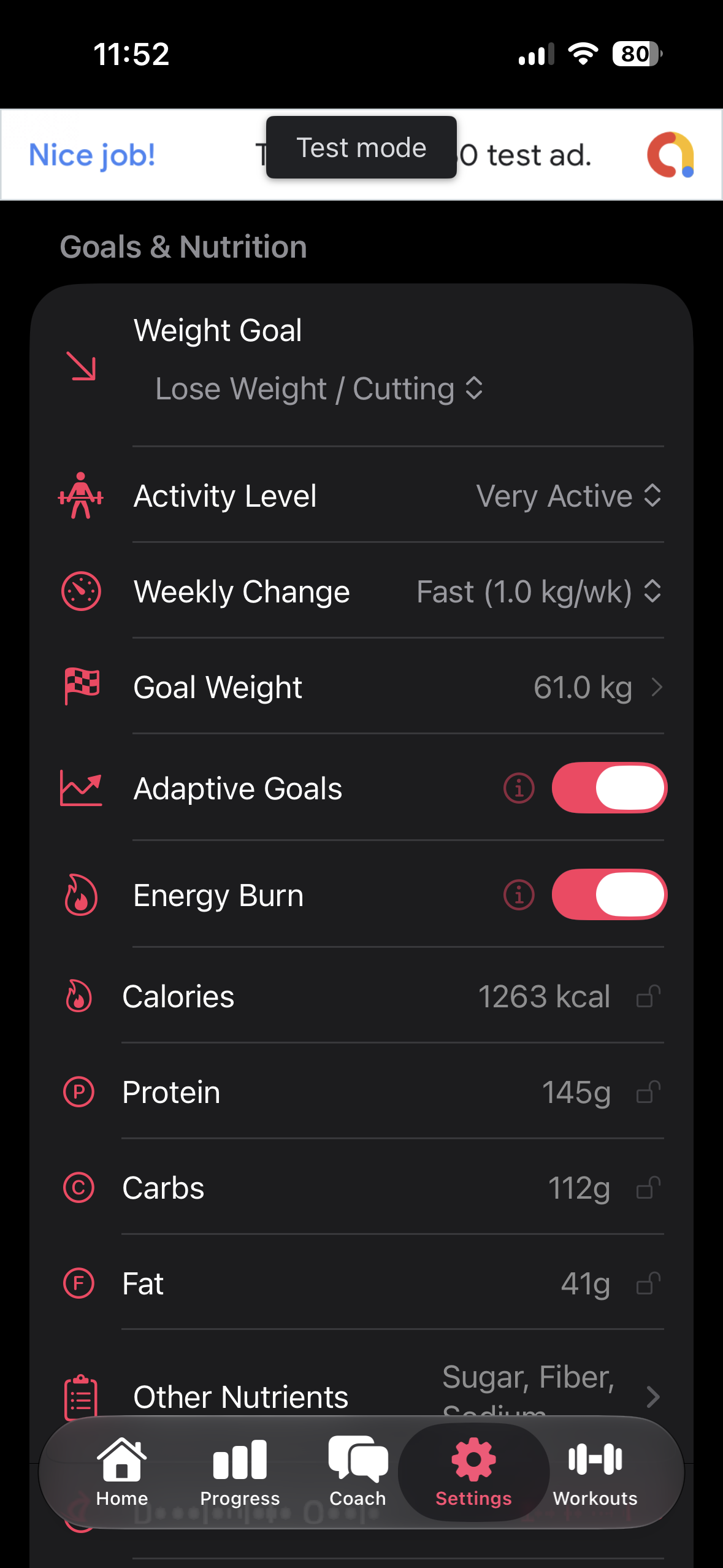
  • Personalized BMR + TDEE via Katch-McArdle / Mifflin-St Jeor
  • Auto daily targets, fully overridable, with per-macro pin / auto-balance
  • Expanded optional nutrient goals stay separate from calorie/protein/carbs/fat math
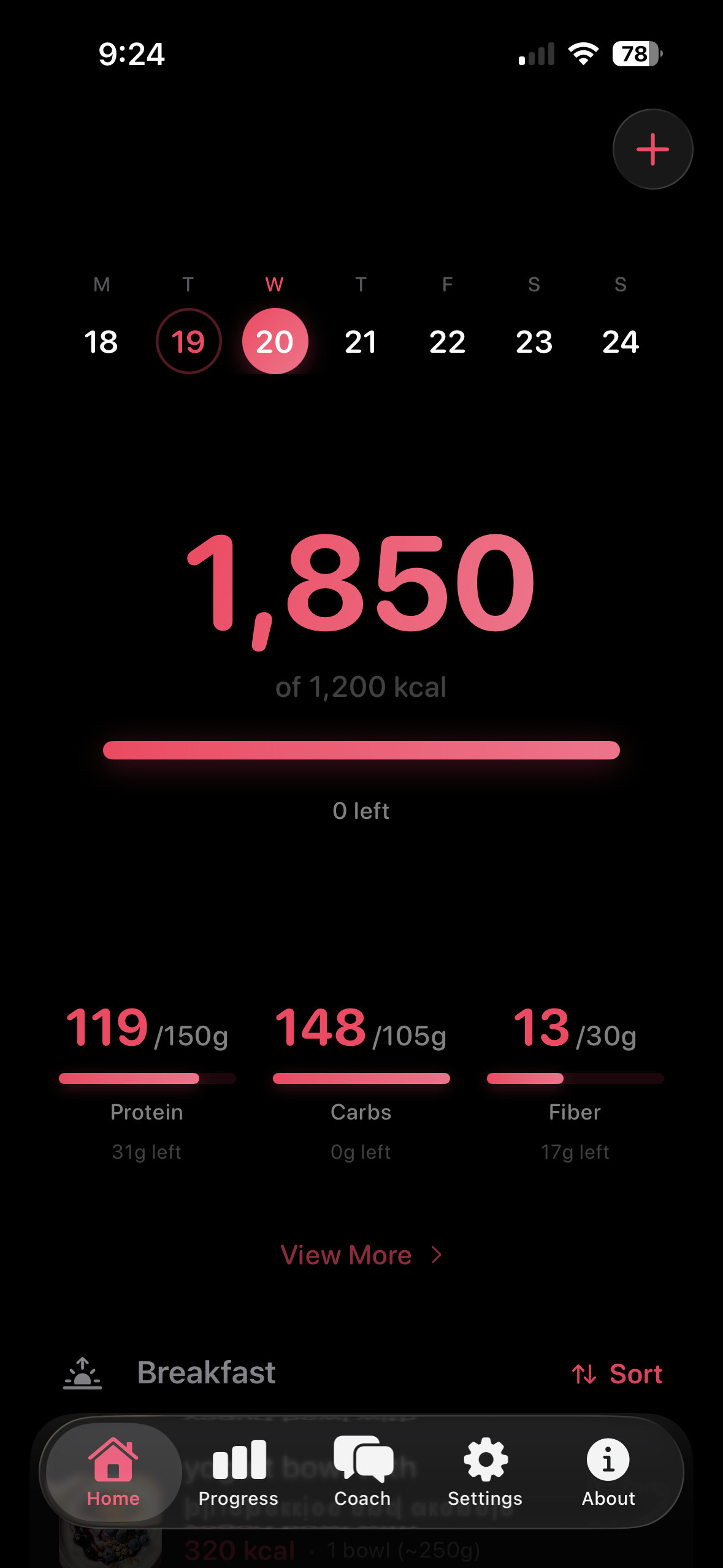
  • Home cards can show macros or selected detailed nutrients
  • Browse past days with the date strip; configurable week start and optional latest-first food log sorting
04

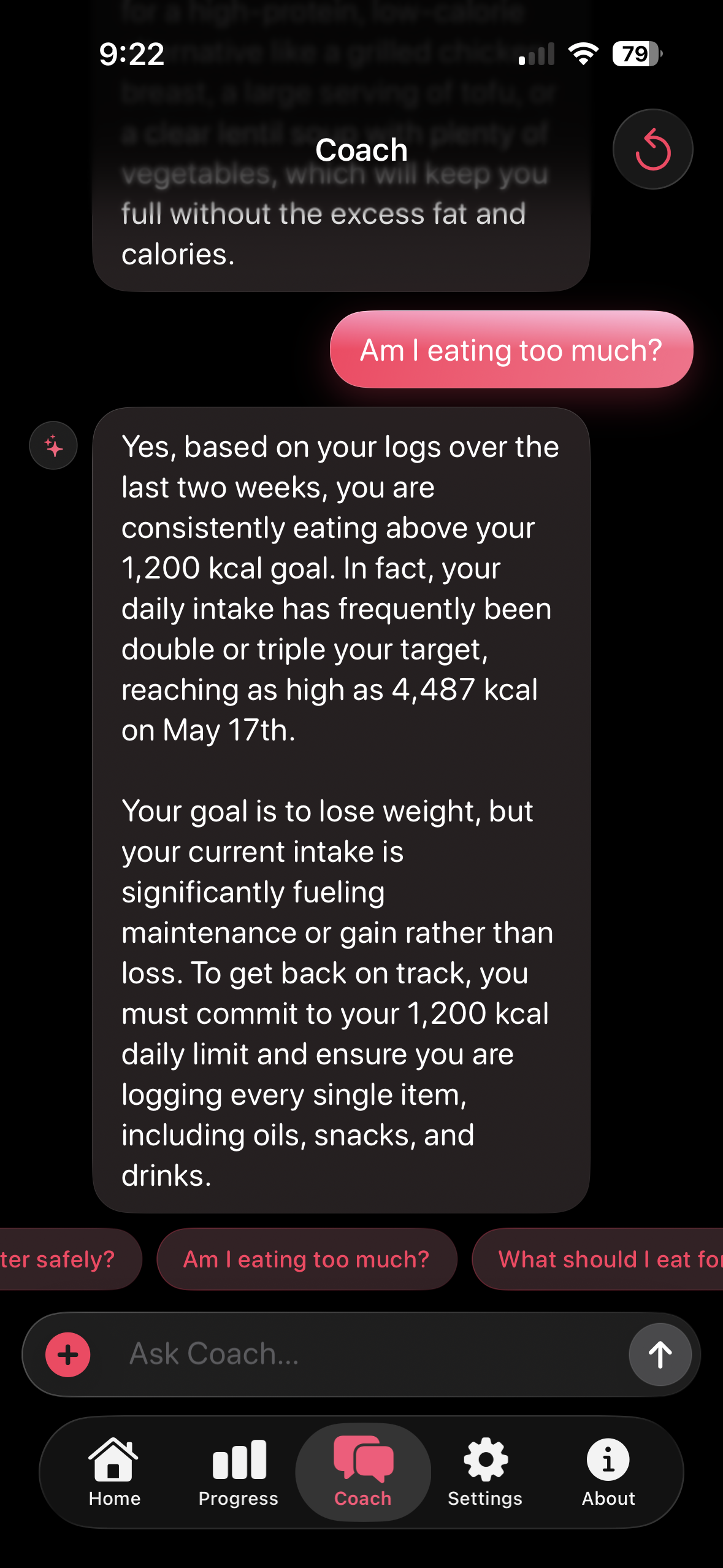
Talk to your Coach.

Multi-turn AI chat

A dedicated tab where the AI sees your full profile, weight history, food log, current date/timezone, richer meal details, and a thermodynamic forecast. Ask "what's my expected weight in 30 days?" or "am I eating enough protein?" and get answers grounded in your own data.

  • Memory persists locally across sessions
  • Goal-aware prompt chips for Lose / Gain / Maintain
  • Long-press any reply to copy
05

Glance from anywhere.

Home Screen + Lock Screen widgets

iOS ships five widget families across Home Screen and Lock Screen — circular, rectangular, inline, small, medium — with both Calorie and Protein widgets. Android ships Calorie and Protein Glance widgets in two sizes each (small + medium). All update the moment you log a meal.

  • Pink-gradient calorie ring with macro progress at a glance
  • Above-the-clock circular and below-the-clock rectangular on iOS Lock Screen
  • Auto-roll over at midnight without opening the app
06

Sync with Apple Health & Health Connect.

Bidirectional · iOS + Android

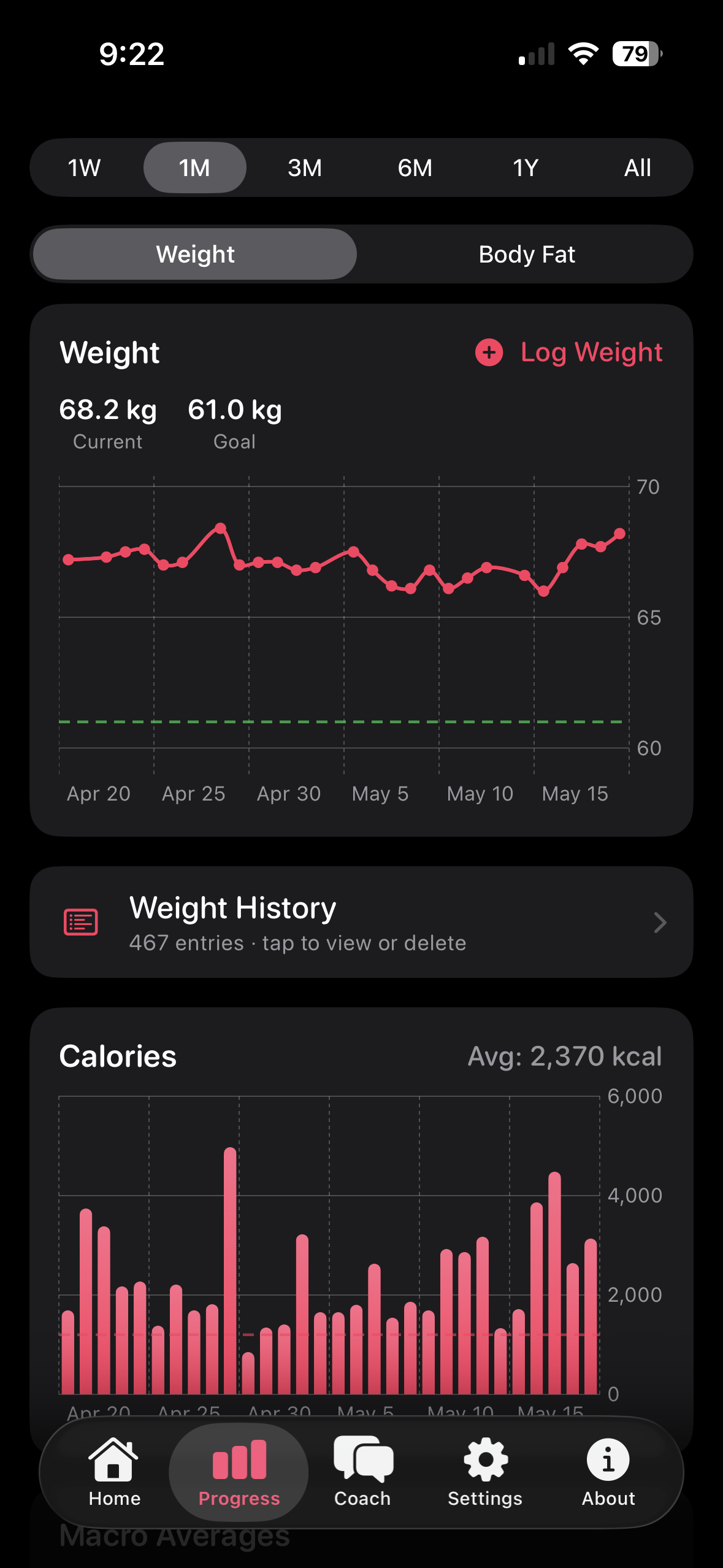
iOS writes meal nutrition plus body measurements (weight, height, body fat) to Apple Health and reads profile/body metrics back when authorized. Android syncs nutrition, weight, and body fat through Health Connect with permission reconciliation and backfill support.

  • Background observers for real-time bi-sync
  • UUID-tagged samples for safe per-entry deletion (no orphans)
  • Delete All Data is local-only — Apple Health / Health Connect data is never touched
07

Speaks fifteen languages.

Auto-localized

English, Arabic, Azerbaijani, Chinese (Simplified), Dutch, French, German, Hindi, Italian, Japanese, Korean, Portuguese (Brazil), Romanian, Russian, Spanish — auto-selected by your phone's system language on both iOS and Android. Voice input can also be guided separately per STT provider.

08

Make it yours.

Theme colors + matching icons

Choose Fud Pink, red, orange, green, mint, teal, blue, or purple in Settings. The accent color updates across tabs, buttons, rings, charts, and the iOS app icon / Android launcher icon.

§ 03   Process

From photo to log in seconds.

Step 01

Capture

Snap a photo, add a note, scan a label, pick from library, type, or speak your food details.

Step 02

Analyze

Your chosen AI provider identifies the food and estimates the full nutrition profile.

Step 03

Review

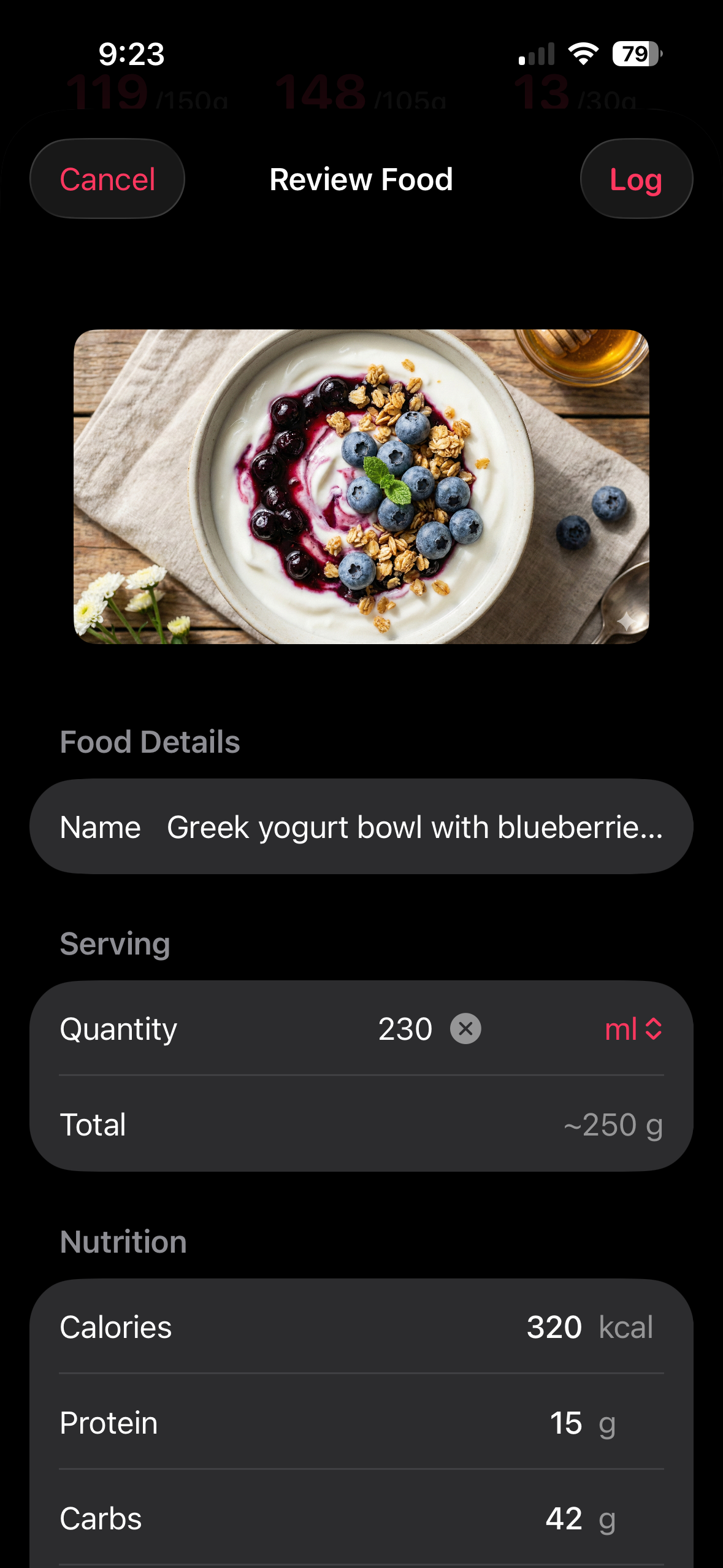
Edit the name, adjust grams or a visible unit like slices/pieces/ml, confirm meal type. You stay in control of every entry.

Step 04

Log

Saved locally on your device. Synced to Apple Health or Health Connect if enabled. Widgets update instantly.

Step 05

Track

Dashboard, charts, and Coach context update in real time across the app.

§ 04   Plates

A few plates from the deck.

Home dashboard
PLATE 01Home · Dashboard
Logging options menu with camera, photos, notes, text, voice, manual, and saved meals
PLATE 02Log · Options
Snap food
PLATE 03Snap · Capture
Review food entry
PLATE 04Review · Edit
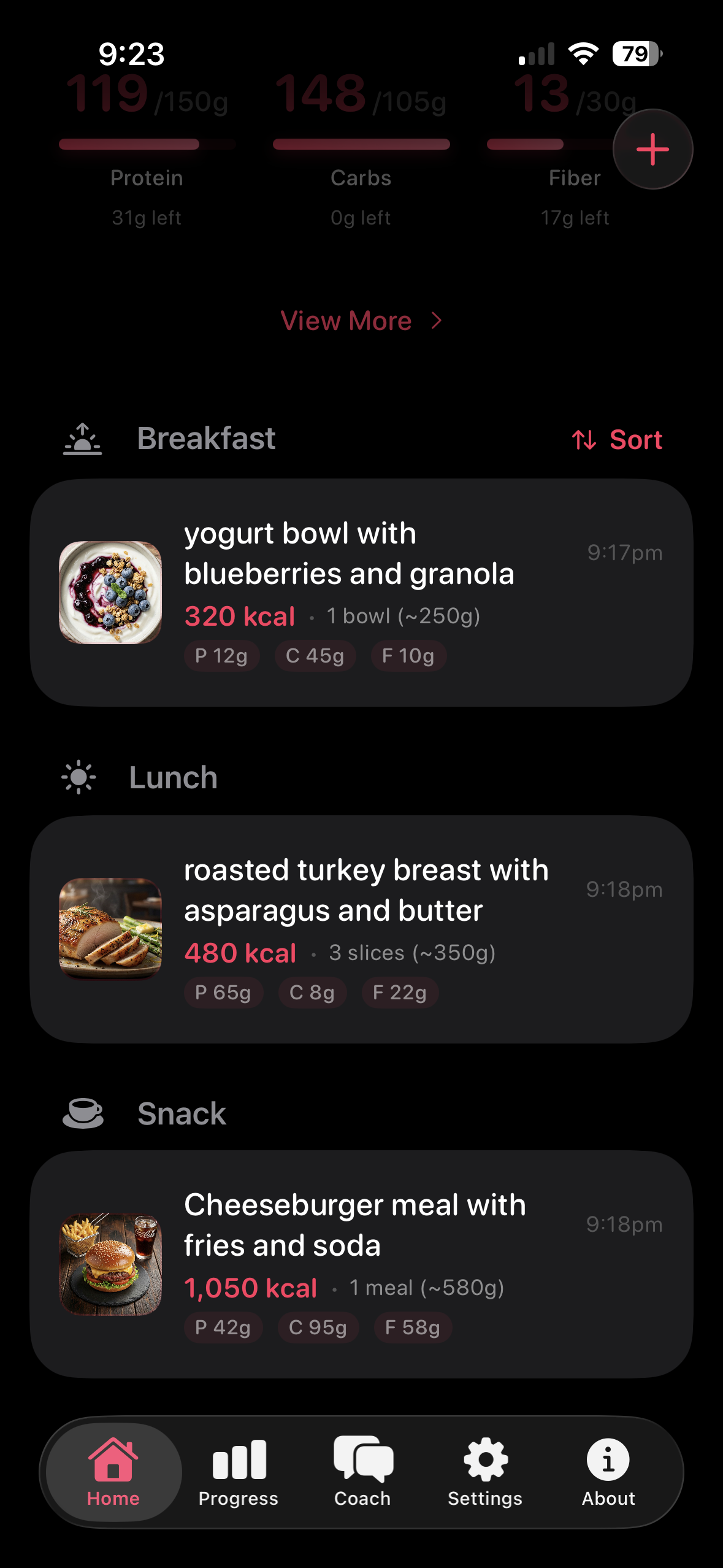
Meals log
PLATE 05Meals · Log
AI Coach chat
PLATE 06Coach · AI Chat
Progress charts
PLATE 07Progress · Charts
Detailed nutrition and optional nutrients
PLATE 08View More · Nutrients
Coda

Start tracking today.

Free, open source, privacy first. Bring your own AI key or use optional Fud AI Plus on iOS — no Fud AI account, no cloud sync, no in-app tracking. Available on iOS and Android with Camera + Camera, photo notes, barcode logging, and customizable nutrient goals.

§ 05   FAQ

Fud AI app, plainly answered.

Is Fud AI the Fud app?

Yes. Fud AI, Fud AI app, Fud app, and AI Fud all point to the same open-source calorie tracker for iPhone and Android.

Can it work as an AI food scanner?

Yes. Log food from camera photos, barcode lookup, photo-library images, photos with notes, nutrition labels, voice, text, saved meals, or manual entry.

Does it replace a macro tracker?

It tracks calories, protein, carbs, and fat, plus detailed nutrients like fiber, sugar, fats, cholesterol, sodium, potassium, calcium, iron, magnesium, zinc, vitamins, folate, and omega-3 when available.

Can I use it without an API key?

Bring Your Own Key is always available. On iOS, optional Fud AI Plus adds no-key Gemini food analysis, Deepgram speech transcription, and Coach access with daily limits.

Does it sync with Health apps?

Yes. Fud AI supports Apple Health on iPhone and Health Connect on Android for body measurements and meal nutrition when you explicitly enable sync.

Is it private and open source?

Yes. There is no Fud AI account, no cloud sync, no in-app tracking, and no ads. The MIT-licensed source code is available on GitHub.